Accidentally deleted user recovery (Active Directory & Exchange 2013)

Standard

Start with recovering user in Active Directory. Download and unzip AdRestore utility.

Run adrestore to see all deleted objects or adrestore string to filter the list by string. Find user you want to recover and run adrestore once more with /r to restore the objects – you will be propted one by one.
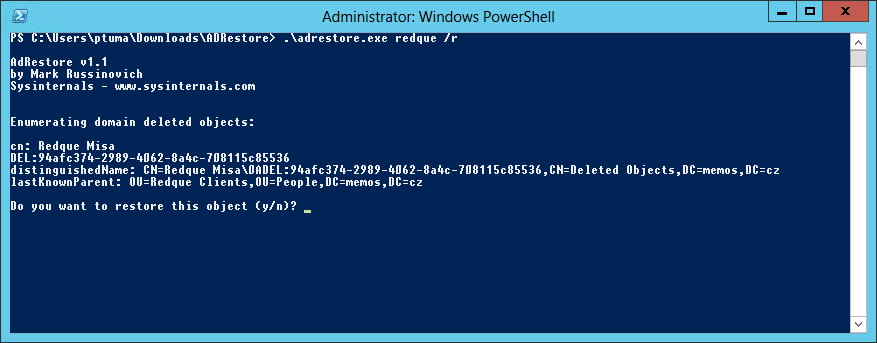
adrecover

Now the account will reappear in Active Directoy, but will be disabled. Use what ever way you like (GUI or command line) to change password and enable account back. Add back user to the groups you want optionally.

Now move to Exchange …

If you deleted user in Active Directory, it disappears from EAC, but its mailbox state is not changed immediately in Exchange database (it changes when regular database maintanance is preformed), so we need to update it manually. To do so, we need to find mailbox GUID first.

Open Exchange Management shell and run following command to list all mailboxes details. Find GUID of the mailbox you want to recover.

Get-MailboxDatabase | Get-MailboxStatistics | Format-List DisplayName, MailboxGuid, Database, DisconnectReason, DisconnectDate

Update mailbox state for the particular mailbox, change to your Exchange database name and GUID you found in previous step.

Update-StoreMailboxState -Database “db_name” -Identity “guid”

Then go to Exchange Admin Center to Recipients / Mailboxes and click ... in the icon line and select Connect Mailbox.
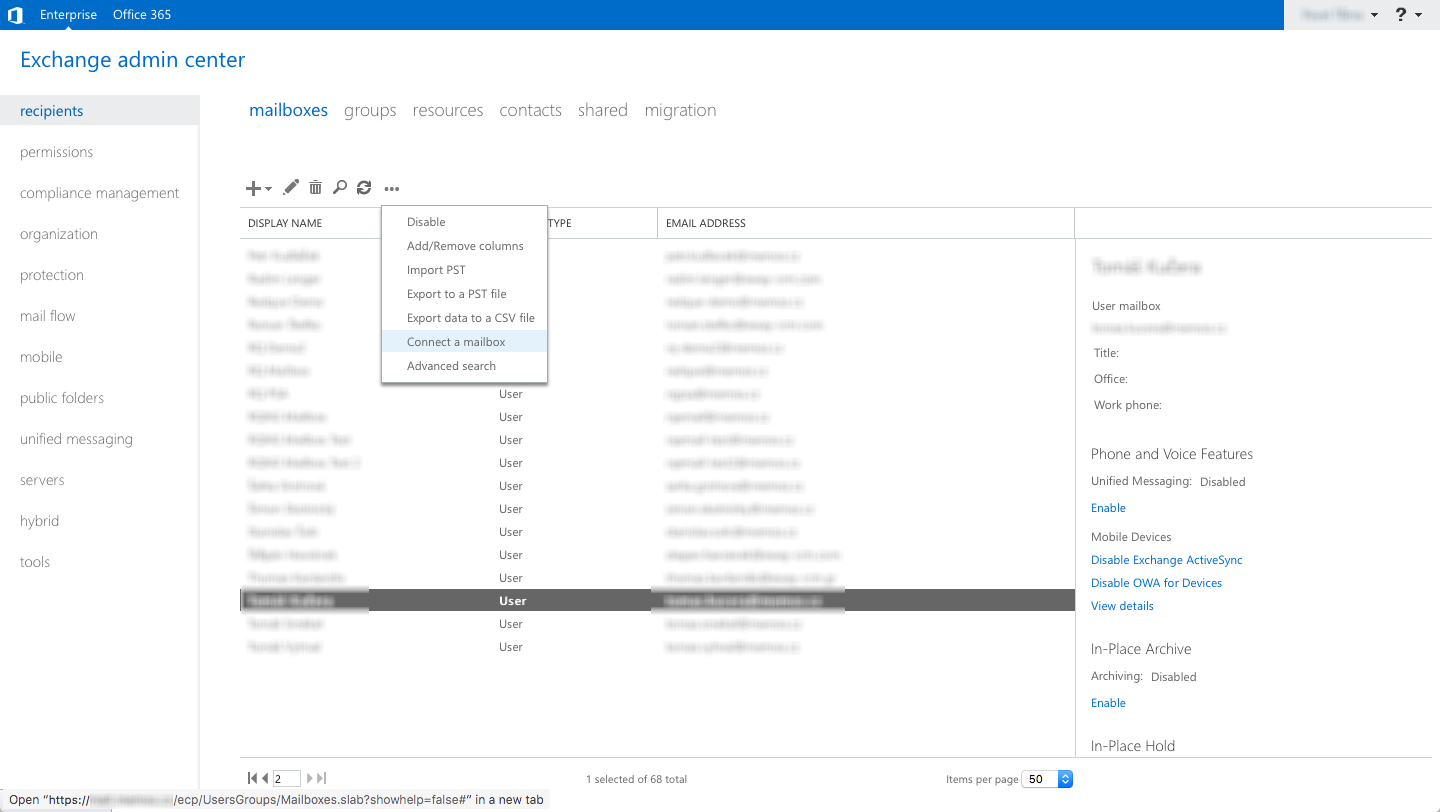
eac1

Now you should see disconnected mailbox you want to recover. So select it and click connect icon.
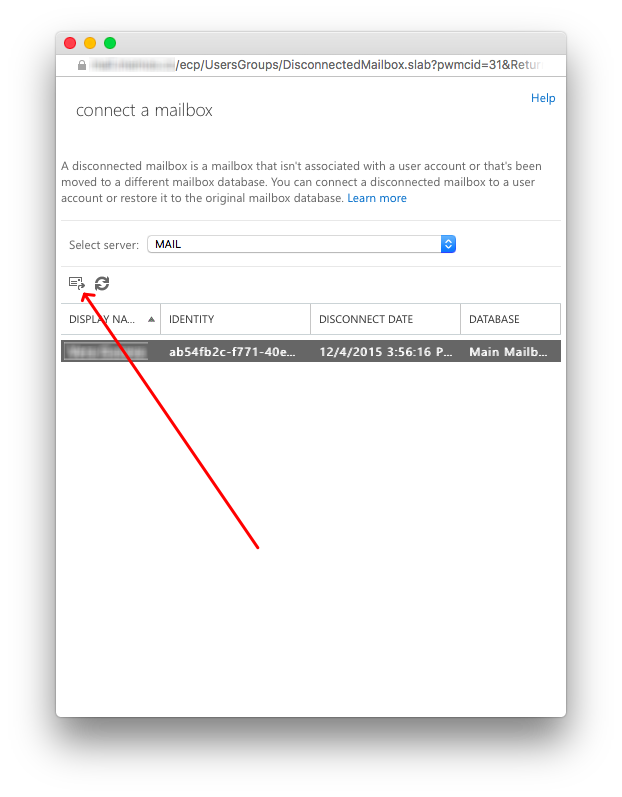
eac2

You’ll get the warning there is no corresponding user and you must connect it to different user. It may be whatever user which does not have connected mailbox yet. That’s alright as the account you recovered in Active Directory does not have a mailbox yet. So go ahead. In the following wizard select user mailbox and later the account you recovered.

At the end you may get notification that changes made will be taken into account when Active Directory replication occurs.
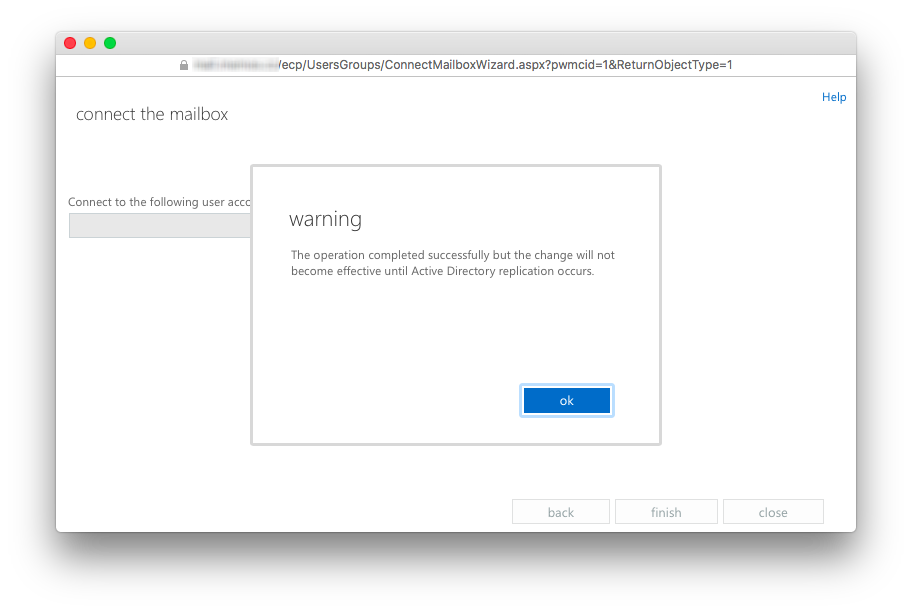
eac3

If you wnat to be sure, trigger replication manually on any domain controller.

repadmin /syncall

Now you should be able to access the mailbox again.
New skill: RPM packages

Standard

I have created my first RPM packages for Rubinius Ruby implementation. Find more in my other blog post at Zonio.

We use Rubinius at Zonio for our upcoming freebusy aggregation and lookup service which heavily depends on concurrent running workers which access calendars accounts and get (or even calculate) free busy from the calendar data. Now we can simply install RPM package instead of compiling the source code when we build production Docker images and development Vagrant boxes. 10 seconds to install RPM versus 10 minutes to compile the source code :)

L2TP/IPSec VPN client on Fedora

Standard

Follow the next steps to establish “road warrior” pre-shared secret L2TP VPN connection to remote VPN server (running RouterOS 5.24 in my case) from your Fedora system.

Install ipsec and l2tp packages.

$ yum install libreswan xl2tpd

Main IPSec configuration is located in /etc/ipsec.conf and /etc/ipsec.secrets. You can review it, but no changes are required to Fedora’s default that basically enables NAT traversal and includes /etc/ipsec.d/*.conf and /etc/ipsec.d/*.secrets files into the configuration.

Create new configuration file in /etc/ipsec.d/desired_vpn_name.conf with following content and replace connection name and local and remote IPs.

conn VPN_CONNECTION_NAME
 authby=secret
 pfs=no
 auto=add
 keyingtries=3
 dpddelay=30
 dpdtimeout=120
 dpdaction=clear
 rekey=yes
 ikelifetime=8h
 keylife=1h
 type=transport
 left=YOUR_LOCAL_IP_ADDRESS
 leftnexthop=%defaultroute
 leftprotoport=17/1701
 right=REMOTE_VPN_SERVER_IP_ADDRESS
 rightprotoport=17/1701

Create new secrets file in /etc/ipsec.d/desired_vpn_name.secrets with following content and replace remote server IP and pre-shared secret.

%any REMOTE_VPN_SERVER_IP_ADDRESS : PSK "YOUR-PRE-SHARED-SECRET"

Start IPSec daemon in foreground to ensure IPSec stack is in your kernel and testing your configuration later.

$ ipsec pluto --stderrlog --config /etc/ipsec.conf --nofork

If you find out following section in the output:

No Kernel XFRM/NETKEY interface detected
No Kernel KLIPS interface detected
No Kernel MASTKLIPS interface detected
Using 'no_kernel' interface code on 3.16.3-200.fc20.i686

it means there is no IPSec stack in your kernel and you have to load apropriate module into the kernel manually by:

$ modprobe af_key

If you have no IPSec stack in the kernel and continue you will get completely misleading error when trying to connect the tunnel.

022 "VPN_CONNECTION_NAME": We cannot identify ourselves with either end of this connection.

When everything is alright you should see just:

Using Linux XFRM/NETKEY IPsec interface code on 3.16.3-200.fc20.i686

Add your new connection by:

$ ipsec auto --add VPN_CONNECTION_NAME

Now configure L2TP part. Add a new section to /etc/xl2tpd/xl2tpd.conf and replace connection name and remote server IP.

[lac VPN_CONNECTION_NAME]
lns = REMOTE_VPN_SERVER_IP_ADDRESS
ppp debug = yes
pppoptfile = /etc/ppp/options.xl2tpd.VPN_CONNECTION_NAME
length bit = yes

And create new file /etc/ppp/options.xl2tpd.VPN_CONNECTION_NAME with your new PPP options and put there following configuration (replace username and password for authentication).

ipcp-accept-local
ipcp-accept-remote
refuse-eap
require-mschap-v2
noccp
noauth
idle 1800
mtu 1410
mru 1410
defaultroute
usepeerdns
debug
lock
connect-delay 5000
name AUTH_USERNAME
password AUTH_PASSWORD

Start all daemons and connect the tunnel

$ systemctl start ipsec
$ systemctl start xl2tpd
$ echo "c VPN_CONNECTION_NAME" > /var/run/xl2tpd/l2tp-control

To disconnect do

$ echo "d VPN_CONNECTION_NAME" > /var/run/xl2tpd/l2tp-control

Remind: if you successfully reached this point you have the tunnel only and you need to add your routes manually to access the networks behind the tunnel!

Broken Fedora 20 MariaDB/MySQL packages

Standard

Just tried to install MariaDB and later MySQL databases on Fedora 20, but could not start the server. The log file shows:


[root@localhost ~]# cat /var/log/mysqld.log
140108 15:11:19 mysqld_safe Starting mysqld daemon with databases from /var/lib/mysql
140108 15:11:19 [ERROR] mysqld: File '/var/lib/mysql/aria_log_control' not found (Errcode: 13)
140108 15:11:19 [ERROR] mysqld: Got error 'Can't open file' when trying to use aria control file '/var/lib/mysql/aria_log_control'
140108 15:11:19 [ERROR] Plugin 'Aria' init function returned error.
140108 15:11:19 [ERROR] Plugin 'Aria' registration as a STORAGE ENGINE failed.
140108 15:11:19 InnoDB: The InnoDB memory heap is disabled
140108 15:11:19 InnoDB: Mutexes and rw_locks use GCC atomic builtins
140108 15:11:19 InnoDB: Compressed tables use zlib 1.2.8
140108 15:11:19 InnoDB: Using Linux native AIO
140108 15:11:19 InnoDB: Initializing buffer pool, size = 128.0M
140108 15:11:20 InnoDB: Completed initialization of buffer pool
InnoDB: The first specified data file ./ibdata1 did not exist:
InnoDB: a new database to be created!
140108 15:11:20 InnoDB: Setting file ./ibdata1 size to 10 MB
InnoDB: Database physically writes the file full: wait...
140108 15:11:20 InnoDB: Log file ./ib_logfile0 did not exist: new to be created
InnoDB: Setting log file ./ib_logfile0 size to 5 MB
InnoDB: Database physically writes the file full: wait...
140108 15:11:20 InnoDB: Log file ./ib_logfile1 did not exist: new to be created
InnoDB: Setting log file ./ib_logfile1 size to 5 MB
InnoDB: Database physically writes the file full: wait...
InnoDB: Doublewrite buffer not found: creating new
InnoDB: Doublewrite buffer created
InnoDB: 127 rollback segment(s) active.
InnoDB: Creating foreign key constraint system tables
InnoDB: Foreign key constraint system tables created
140108 15:11:20 InnoDB: Waiting for the background threads to start
140108 15:11:21 Percona XtraDB (http://www.percona.com) 5.5.34-MariaDB-31.1 started; log sequence number 0
140108 15:11:21 [Note] Plugin 'FEEDBACK' is disabled.
140108 15:11:21 [ERROR] mysqld: Can't find file: './mysql/plugin.frm' (errno: 13)
140108 15:11:21 [ERROR] Can't open the mysql.plugin table. Please run mysql_upgrade to create it.
140108 15:11:21 [ERROR] Aria engine is not enabled or did not start. The Aria engine must be enabled to continue as mysqld was configured with --with-aria-tmp-tables
140108 15:11:21 [ERROR] Aborting

140108 15:11:21 InnoDB: Starting shutdown...
140108 15:11:22 InnoDB: Shutdown completed; log sequence number 1597945
140108 15:11:22 [Note] /usr/libexec/mysqld: Shutdown complete

140108 15:11:22 mysqld_safe mysqld from pid file /var/run/mariadb/mariadb.pid ended
[root@localhost ~]#

The problem is mysql_install_db script in packages mariadb-server-5.5.34-2.fc20 and community-mysql-server-5.5.35-1.fc20 does not set up proper permissions on server data directory. Run following command under root to fix it:

chown -R mysql:mysql /var/lib/mysql

Project Weather

Standard

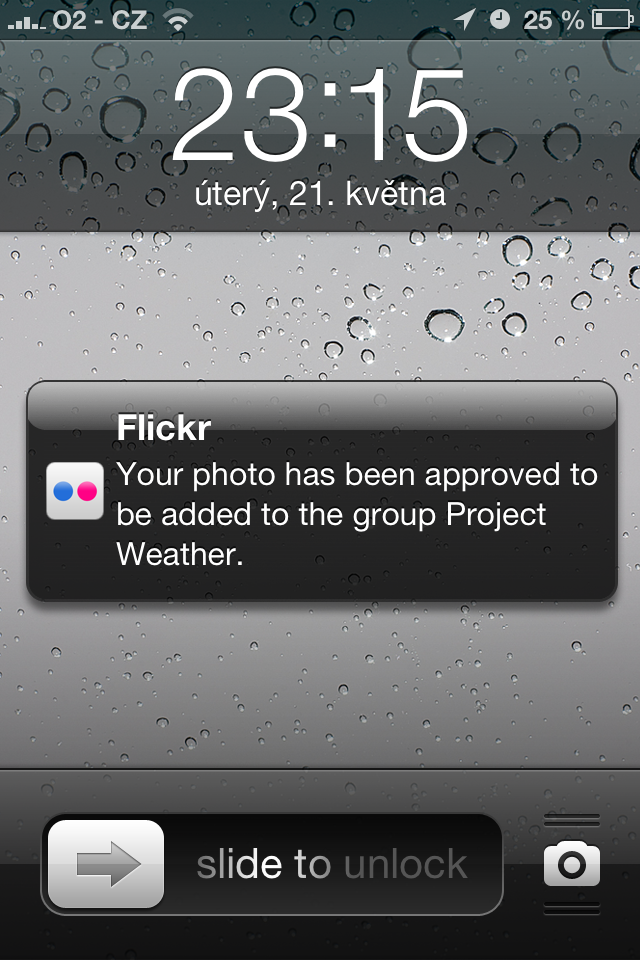
I would never say one of my favorite applications (at least nowadays) could be a weather app. Of course there is something Yahoo’s new weather app for iOS has extra compared to other regular weather apps – they show Flickr photos matching the location and the actual weather at that location. Cool. There are many photos from big places such as Prague, there are a few from place like Budweis and there are almost none from places like Opava. But the best of all … you can add your photos to be displayed in the app. So I tried and … succeeded!

Project weather

To add new pictures follow this HOWTO.

New achievement: video editing

Standard

I always wanted to learn video editing, but as usually I was not able to dedicate any time to learn it until I had something that absolutely necessarily needed to be done. We had to shoot a video about Zonio team for Wayra application. So to keep it super simple – we shot a stop motion animation using iMotion HD  (love the remote trigger feature – using second phone to trigger picture taking), recorded our own sound effects using WavePad (don’t like it much as it looks and behaves as desktop app when on iOS … equals is too complicated) , edited sound is Audacity and edited video in iMovie. So here is my first clip …

Even with limited time for it, I started to like it :) My next project will be to edit a clip with our freeride footage form Krippenstein in last March.

Boring … but two user experience improving highlights

Standard

You may noticed Apple events started to be just copycats of itself. There is nothing new in the format. And what is worse there is not much new interesting things in its content neither although all those glitzy words “revolutionary”, “all new” or “best ever”. The whole show just became boring … thiner, faster, lighter all that we have seen last time and time before last time too :( My two highlights from yesterday are more simple iTunes and Lightning connector that fits both ways. First one desperately needed it as it became super bloated over the years. We have to wait for hands on, but it looks promising. The second is something I appreciate as the best from yesterday – there is still someone at Apple thinking how the people use the products. It is super small change, but imagine how much time, effort and frustration will be saved by not playing with finding the proper way to connect the connector. Respect!

Wireless overload

Standard

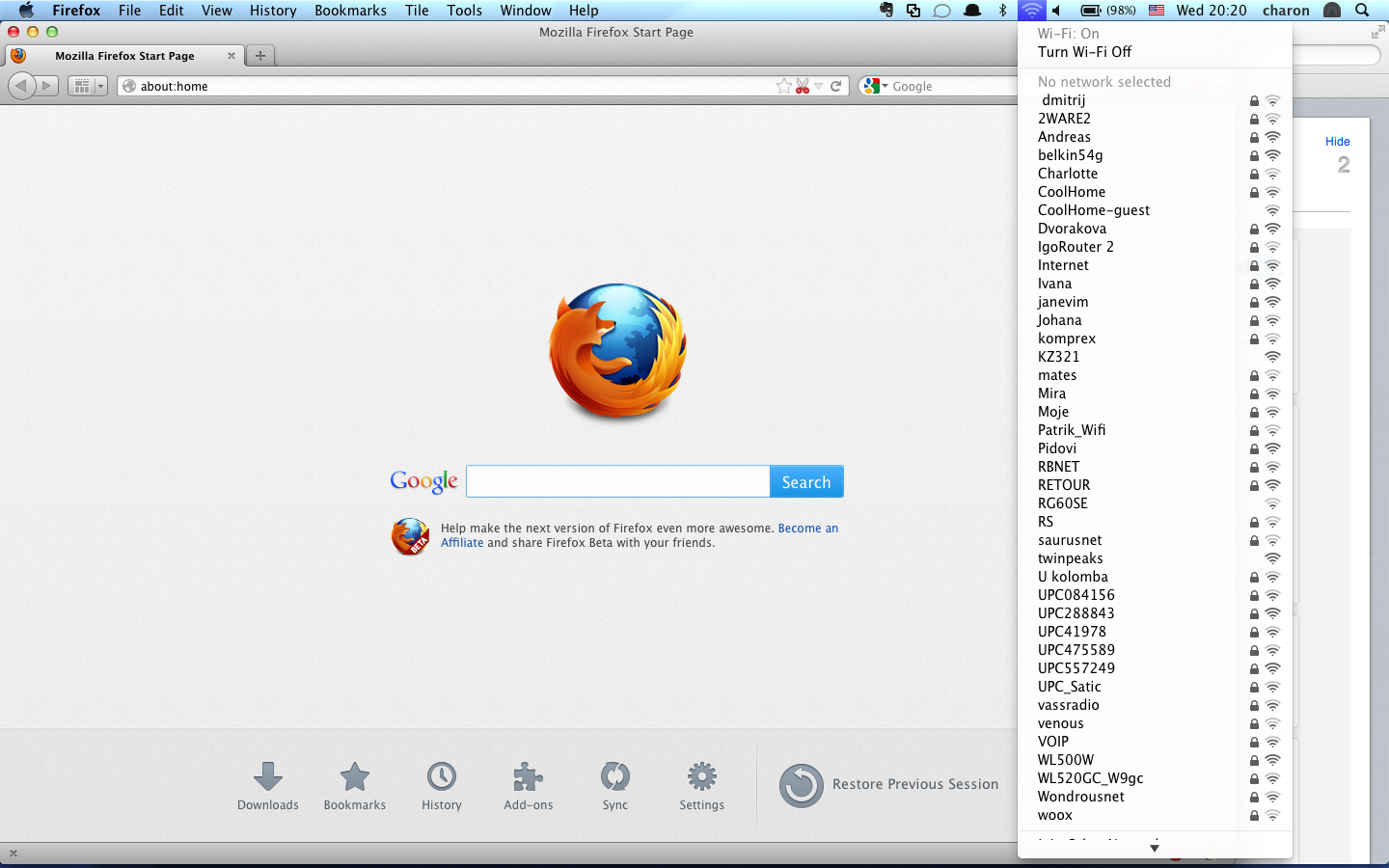
Usually there is no wifi signal when you (desperately) need it. But not when I went outside of my flat on a terrace and brought a notebook with me instead of my regular and favorite “company” for the terrace – a drink :) This time I would have had a completely different problem – to find my own network, but fortunately Mac OS sorts the networks in alphabetical order in case it does not remember them well (which it apparently does not).